
Named streams and topics
Follow the declared pipeline graph and click nodes to inspect captured records. Keep the raw JSON and transport metadata visible.
StreamPlay / Revenir
Open-source projectIn developmentSend controlled events through real processing code. Inspect the input and output JSON, then save useful experiments as tests with expected and actual results in one place.
View source and setup on GitHub ↗Apache-2.0 · Runs locally · Active development; no stable release yet.
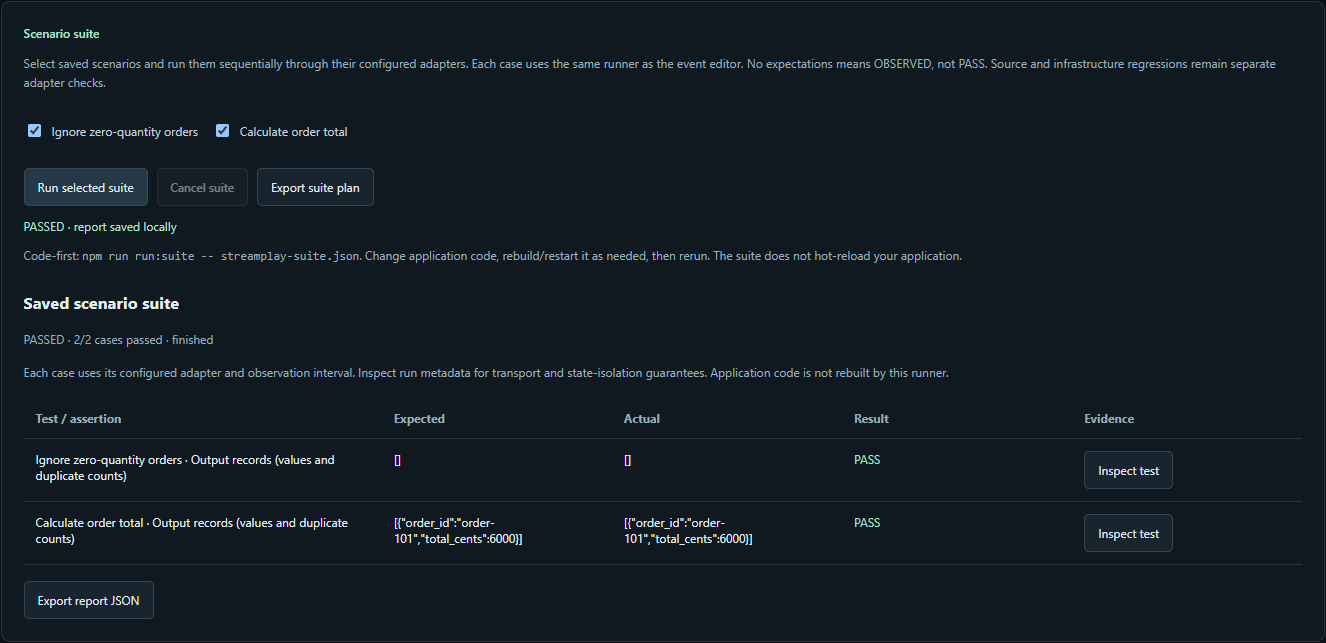
Actual local execution of the included Node.js example: expected and actual records, per-test JSON inspection, and an exportable report. The same scenarios run from the command line.
Follow the declared pipeline graph and click nodes to inspect captured records. Keep the raw JSON and transport metadata visible.
Import fixtures, configure independent sources, and test timed input or silence. Application events and sensor readings use the same workbench.
Change code in your editor, rerun one scenario or a suite, inspect mismatches, and retain the evidence—even when a run fails or is cancelled.
A retry delivers the same event twice. Summing both deliveries incorrectly gives $120. Your application should recognize the repeated event_id and count its $60 once. StreamPlay lets you replay that input and check whether your code produces the expected result.
1. Replay these two deliveries
[
  {
    "event_id": "evt_01",
    "order_id": "ord_123",
    "amount": 60.00
  },
  {
    "event_id": "evt_01",
    "order_id": "ord_123",
    "amount": 60.00
  }
]
2. Test your transformation
JavaScript example: keep each event_id once per order. Different events for the same order still count.
function summarizeOrder(events, orderId) {
  const seen = new Set();
  let total = 0;

  for (const event of events) {
    if (event.order_id !== orderId) continue;

    // Ignore a second delivery of this event.
    if (seen.has(event.event_id)) continue;
    seen.add(event.event_id);
    total += event.amount;
  }

  return {
    order_id: orderId,
    total,
    unique_events: seen.size,
  };
}

summarizeOrder(events, "ord_123");
Remove the seen.has check: total = 120.
Restore it and rerun: total = 60.
3. Check the expected output
{
  "order_id": "ord_123",
  "total": 60.00,
  "unique_events": 1
}
Without the duplicate check → with the check
120.00→60.00
Expected: total = 60 and unique_events = 1. A total of 120 would fail this test.
Illustrative example; this page does not execute the code. Your application owns deduplication; StreamPlay supplies test events and helps you inspect results. This JavaScript function keeps state for one batch only. A streaming implementation also needs a retention policy and state recovery.
The development workflow
Keep your processing code in its repository. Use the workbench to supply events, inspect results, and preserve a test you can rerun.
01
Paste JSON, generate sample events, or replay a saved fixture. Start with the data you need to understand.
02
Send those events through your own streaming code in a configured test environment. Keep working in your editor.
03
Read the actual input and output JSON, record metadata, logs, and errors together. Follow the fields that matter.
04
Adjust your transformation or configuration and compare the results. Save a test once you know what to expect.
Built around your existing code
The workbench brings event generation, application execution, raw payloads, and run comparisons together. Explore first. Save scenarios and add checks when the expected behavior is clear.
If you work with dbt, the feedback loop will feel familiar: change a transformation, run representative data, inspect the result, and repeat. StreamPlay is bringing that experience to streaming applications.
Runnable examples exercise real processing engines. Each example documents setup, state assumptions, cleanup and automated checks.
| Your application | Event transport |
|---|---|
| Apache Flink SQL | Kafka → Flink → Kafka |
| Apache Flink | Local Kinesis → Flink → local SQS |
| Kafka Streams | Kafka → Kafka Streams → Kafka |
The Kinesis/SQS example uses LocalStack. These examples do not certify real AWS deployments or arbitrary applications. See the repository’s validation notes and current CI results.
Open-source project · In development
The repository is public with local setup, executable examples, scenario suites and contribution instructions. Start with the Node.js quickstart or a containerized streaming example. General application setup and state isolation are still being developed.
Created by Carl Salazar (@kc-salazar) at Revenir.
Reproducible scenarios, adapter tests, and clearer inspection are useful places to start.
Back to Revenir →